MIM Migration: Custom Rules to Know Before Transitioning to SailPoint IdentityIQ
Key Takeaways
- Inventory before migrating: MIM configuration reports reveal management agents, synchronization rules, and workflow dependencies, but may not expose compiled code logic.
- Know the compatibility limits: Of 87 MIM Workflow Activity Library functions assessed in the migration guide, 70 are supported, making explicit handling of unsupported functions essential.
- Recover logic carefully: Decompiling compiled rules-extension assemblies can help recover underlying logic when original C# or VB source files are unavailable.
- Validate before cutover: Parallel provisioning comparisons help identify differences between existing MIM behavior and the proposed IdentityIQ implementation.
Why Microsoft Identity Manager Migration Requires More Than Data Transfer
Microsoft Identity Manager (MIM) migration involves more than transferring identities, attributes, and account records into SailPoint IdentityIQ. Enterprise environments often contain years of accumulated synchronization rules, custom code, lifecycle workflows, connector configurations, and attribute-precedence decisions. If these dependencies are overlooked during a MIM-to-SailPoint IdentityIQ migration, users may receive incorrect access, provisioning behavior may change, or established business processes may stop working after cutover.
Azure IAM, an independent identity and access management consulting firm based in Las Cruces, New Mexico, emphasizes that migration planning must account for the behavior embedded in existing configurations, including logic that may no longer have readable source files.
1. Map Existing MIM Configurations Before Planning SailPoint IdentityIQ Conversion
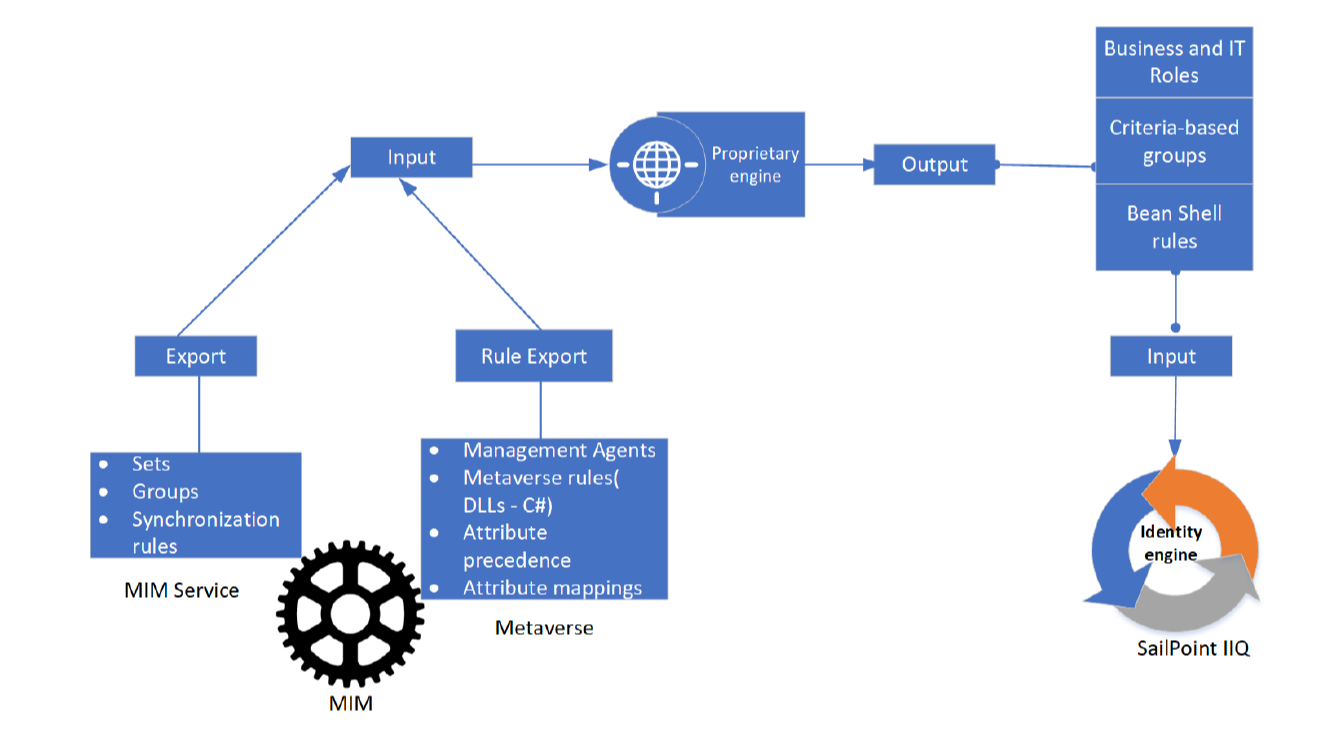
A reliable MIM-to-IdentityIQ migration begins with an inventory of the existing environment. Configuration Documenter reports provide a starting point by identifying management agents, synchronization rules, workflows, and other configuration elements. However, these reports should not be mistaken for a complete representation of every rule's execution logic.
The distinction matters when a synchronization flow invokes a compiled rules extension. A report may show where the extension is used without explaining the decisions made inside its compiled assembly. Converting only the visible configuration can therefore leave a critical gap between the documented design and the behavior IdentityIQ must reproduce.
Before translation begins, teams should classify dependencies, identify missing source files, record unsupported functions, and establish which behaviors require further investigation. This inventory defines the migration scope, informs testing requirements, and helps determine which elements can be translated automatically into IdentityIQ.
2. Recover Custom Rules When Original Source Code Is Missing
Custom rules extensions can contain business logic for attribute transformations, conditional provisioning, data handling, and other identity operations. When original C# or VB source files are unavailable, decompiling the compiled .NET assembly may expose enough underlying logic to support reconstruction and translation for IdentityIQ.
Decompilation does not guarantee restoration of the original project files, comments, or development history. Instead, it helps engineers inspect the logic represented in the compiled assembly and determine how that behavior should be implemented in the destination platform.
Recovered logic must still be reviewed for dependencies, assumptions, and compatibility with IdentityIQ. Constructs such as loops, exception handling, LINQ operations, and external service calls may require manual engineering when the translation process cannot safely convert them. These elements should remain explicitly marked for review rather than being represented as completed migration work.
3. Assess MIM Workflow Compatibility Before IdentityIQ Implementation
Workflow migration presents a separate challenge because an activity that exists in MIM may not have a direct equivalent in IdentityIQ. The migration guide assesses 87 MIM Workflow Activity Library functions, of which 70 are supported. That leaves 17 functions outside the supported set, demonstrating why compatibility must be checked before teams commit to a conversion plan.
Unsupported functions should be mapped to their actual business purpose and assessed for implementation in the destination environment. Some may require an alternative approach, while others may depend on external systems or decisions that need input from process owners. Lifecycle workflows also require careful review of triggers, approvals, timing, and the consequences of failed or incomplete actions.
A migration inventory should distinguish between successfully translated logic, items requiring human decisions, and unsupported constructs awaiting redesign or replacement. This prevents generated IdentityIQ outputs from being mistaken for fully validated workflows.
4. Validate IdentityIQ Provisioning Behavior Before Cutover
Successful conversion does not, by itself, prove that IdentityIQ behaves like the original MIM environment. Differences in attribute precedence, account creation, group membership, lifecycle transitions, and connector responses can affect results even when the configuration appears complete.
A parallel validation period helps expose these differences before production responsibility changes hands. MIM can continue provisioning connected systems while IdentityIQ generates comparable results for review. Teams can then investigate discrepancies, confirm expected behavior with system owners, and resolve critical issues before cutover.
Testing should cover representative identity changes and lifecycle scenarios, including edge cases that are difficult to reproduce from configuration reports alone. The objective is to establish behavioral equivalence where required, while documenting any intentional changes approved during migration.
How to Scope and Validate a MIM-to-IdentityIQ Migration
A dependable migration plan combines configuration discovery, custom-code recovery, workflow compatibility checks, and parallel validation. Teams should track each dependency through a clear status: translated, manually reviewed, awaiting a business decision, or not yet supported. That record makes unresolved risks visible and helps prevent incomplete logic from reaching production unnoticed.
For complex environments, IAM experts can help interpret discovery findings, define a realistic migration scope, and identify engineering work that may affect implementation timelines. This gives teams a clearer basis for deciding which MIM behaviors to preserve, which require rework, and which IdentityIQ outcomes must be tested before production cutover.
Ultimately, a successful MIM-to-IdentityIQ migration depends on understanding the identity logic behind existing configurations well enough to determine what should be reproduced, what needs to change, and how critical provisioning outcomes will be verified before the transition.
Azure IAM, LLC
City: Las Cruces
Address: 2521 North Main
Website: https://azureiam.com


Comments
Post a Comment